
Shopify Store Redesign: When and Why You Need One
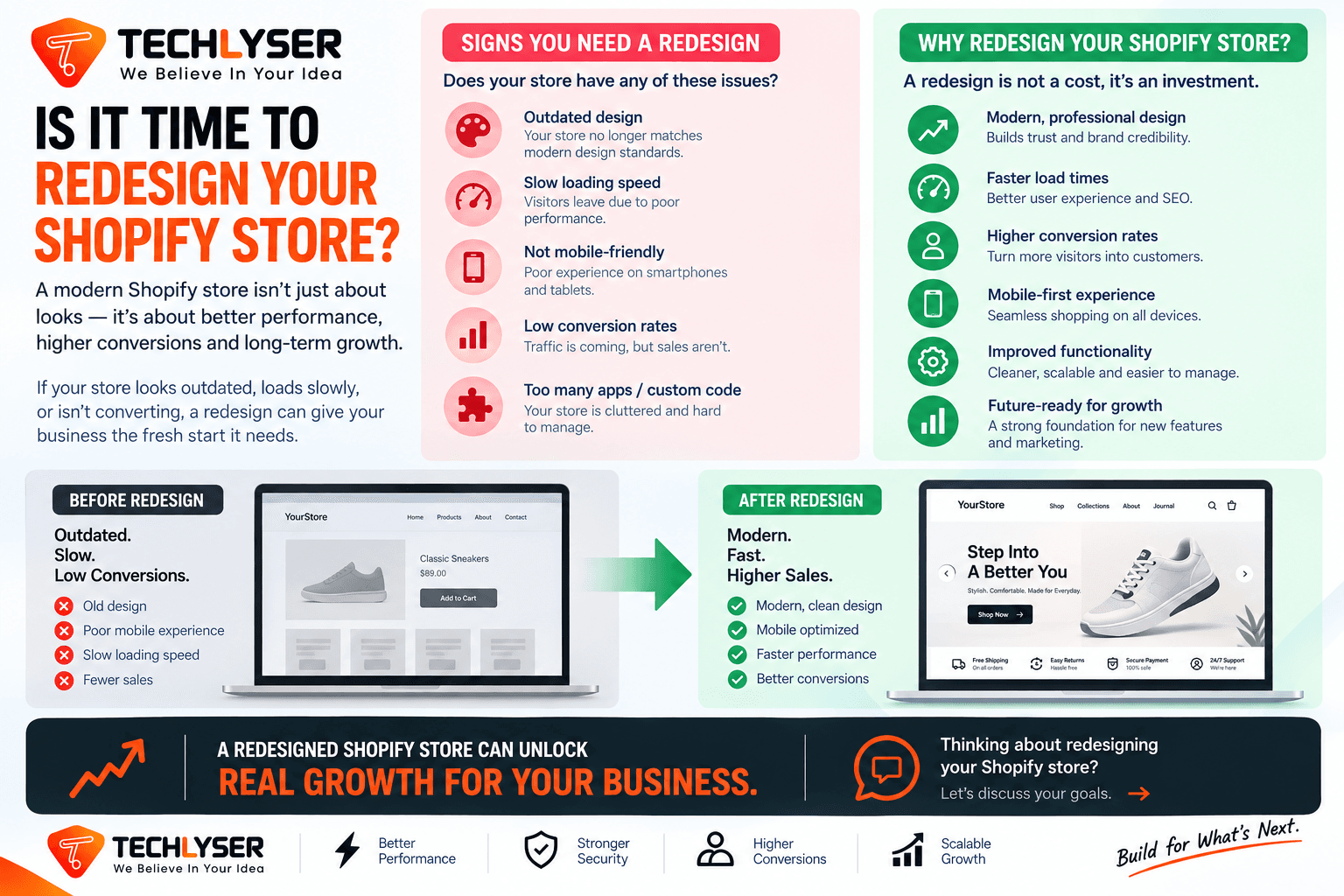
Introduction: The Hidden Cost of an Outdated Shopify Store
Many ecommerce founders and marketing leaders view a website redesign as a purely aesthetic project. They believe that if the checkout button works and the product images are clear, the storefront is fine. However, in modern ecommerce, user expectations change rapidly. An outdated Shopify design does not just look old—it actively drives high-value traffic away, increases customer acquisition costs (CAC), and lowers conversion rates.
Over time, plugins accumulate, brand guidelines evolve, and custom code patches clutter your theme. What once was a fast, high-converting store becomes a slow, disjointed digital experience.
If you are noticing a plateau in sales despite steady traffic, or if your marketing campaigns are generating high bounce rates, your storefront may be the bottleneck. This comprehensive guide details when and why your business needs a Shopify store redesign, how to approach it systematically, and how a custom-engineered storefront can unlock new growth.
5 Critical Signs It Is Time for a Shopify Store Redesign
Recognizing when to redesign your Shopify store requires looking beyond personal aesthetic preferences. You must analyze quantitative performance data and qualitative user behavior. If your store exhibits one or more of the following five signs, a strategic redesign is overdue.
1. High Traffic but Declining Conversion Rates
If your marketing team is successfully driving traffic to your store through paid ads, search, or social media, but your conversion rate (CR) is steadily dropping, you have a user experience (UX) problem.
Modern buyers expect an intuitive path to purchase. If they encounter confusing navigation, unclear product descriptions, or a complex multi-step checkout process, they will abandon their carts. A conversion-focused redesign reassesses the entire user journey, streamlining the path from landing page to checkout.
2. Poor Mobile Usability and High Bounce Rates
With over 70% of retail ecommerce traffic originating from mobile devices, your mobile experience is your primary storefront. Many older Shopify themes were built with a desktop-first mentality, with mobile responsiveness added as an afterthought.
If mobile visitors are bouncing at a significantly higher rate than desktop users, your site's mobile UX is likely flawed. Common issues include:
- Buttons that are too small or positioned too closely together.
- Intrusive pop-ups that block primary content.
- Illegible typography on small screens.
- Navigation menus that are difficult to expand or close.
3. Slow Page Load Times and Failing Core Web Vitals
Google's Core Web Vitals directly impact search rankings and user satisfaction. A one-second delay in mobile load times can impact conversion rates by up to 20%.
Older Shopify sites often suffer from "app bloat"—the residue of dozens of uninstalled applications that have left orphan tracking scripts in your theme.liquid file. These scripts, combined with unoptimized images and heavy custom CSS, degrade site performance. If your Google PageSpeed Insights score is consistently in the orange or red zones, a clean-slate theme rebuilding is required.
4. Fragmented Brand Identity and Outdated Visuals
As businesses grow, their brand identity matures. If your current store uses a generic, off-the-shelf theme that looks identical to hundreds of competitors, you miss an opportunity to build brand equity.
An outdated design fails to project trust, credibility, and premium quality. A modern redesign aligns your storefront with your current brand position, offering custom layouts, rich visual storytelling, and interactive product pages that elevate your market presence.
5. Operational Inefficiencies and Tech Stack Bloat
An outdated backend is just as damaging as a clunky frontend. If your marketing team needs to rely on developers to make simple text updates, launch new landing pages, or organize collections, your operational workflow is broken.
Modern Shopify setups leverage Online Store 2.0 architecture, which utilizes a modular sections-and-blocks framework. This empowers your internal team to build custom layouts on the fly without touching a single line of code, significantly reducing ongoing maintenance costs.
The Business Value of a Custom Shopify Redesign
Investing in a Shopify store redesign is not an expense; it is a strategic business capital allocation. When executed with a performance-first mindset, a redesign delivers measurable improvements across several key business metrics:
- Higher Average Order Value (AOV): By strategically integrating up-selling, cross-selling, and bundle options directly into product pages and cart drawers, you can organically increase basket size.
- Lower Customer Acquisition Cost (CAC) Payback Periods: A higher conversion rate means you extract more value from every dollar spent on paid acquisition, improving marketing ROI.
- Enhanced SEO Visibility: Search engines favor fast, mobile-friendly sites with structured, crawlable data. A modern design built with clean, semantic code and correct schema markup will improve search rankings.
- Future-Proof Scalability: Moving away from fragile, heavily modified templates to a clean, custom-developed theme architecture ensures your site remains stable as transaction volume increases.
Crucial Steps in a Successful Shopify Redesign Strategy
To ensure your new store delivers on your business goals, you must avoid jumping straight into visual design. A successful redesign follows a structured, data-backed methodology.
[Data Audit & UX Heatmaps]
        └──► [Wireframing & UI/UX Design]
                  └──► [Performance-Optimized Development]
                            └──► [SEO Migration & Launch Validation]
Step 1: Data Audit and Heatmap Analysis
Before changing any visual element, analyze how users currently interact with your site. Utilize tools like Google Analytics 4, heatmaps, and session recordings. Identify where visitors drop off, which buttons they click, and where they lose focus. This diagnostic phase ensures your design decisions address actual user pain points rather than assumptions.
Step 2: Content Strategy and UX Wireframing
Design without content is just decoration. Map out your site information architecture. Create wireframes for key page templates: the Home Page, Collection Pages, Product Details Pages (PDPs), and Cart/Checkout. Focus on visual hierarchy, ensuring that high-value information like value propositions, reviews, and call-to-action buttons are prioritized.
Step 3: Custom Theme Development vs. Template Configuration
Many agencies simply install another commercial template and change the colors. For a scaling enterprise, this approach quickly replicates previous performance bottlenecks.
A true custom theme development approach builds a lightweight, tailored framework using Shopify’s modern tools (such as liquid, Tailwind CSS, and headless architectures if necessary). This ensures clean, optimized code with zero redundant script bloat.
Step 4: SEO Migration and URL Mapping
A major risk of a website redesign is losing organic search traffic. When updating your site architecture, ensure that page URLs are either preserved or correctly redirected using 301 redirects. Map out a comprehensive redirection plan to maintain search equity and prevent broken links.
Step 5: Post-Launch Performance Optimization
Once the site is built, it must undergo rigorous testing across different browsers, mobile devices, and operating systems. Verify that the checkout process is smooth, scripts load in the correct sequence, and images are dynamically served in modern next-gen formats like WebP.
How Techlyser Helps You Build a High-Performing Shopify Store
At Techlyser, we do not just design visually appealing websites—we engineer high-performance conversion engines. Our specialized Shopify Development services combine UI/UX expertise with clean, performant development to build fast, scalable storefronts that convert casual visitors into loyal customers.
Our team of dedicated Shopify Developers in India works with global brands to audit search performance, eliminate app bloat, optimize Core Web Vitals, and build custom sections that empower your marketing teams.
Whether you need a complete re-architecture of your custom theme, a migration from an legacy platform, or a dedicated team to elevate your store's mobile speed, Techlyser delivers predictable, measurable business outcomes. Discover how we can transform your storefront by requesting a Free Shopify Audit to identify your site's performance bottlenecks.
Conclusion
A Shopify store redesign is a powerful tool to revitalize your digital brand and capture missed revenue. By transitioning from a slow, template-locked layout to a bespoke, conversion-optimized storefront, you create a seamless shopping experience that ranks higher in search engines and converts traffic with greater efficiency. Do not let an outdated website limit your business's scaling potential.
Comparison
| Metric / Feature | Outdated Theme / Heavy Template | Custom, Optimized Shopify Redesign |
|---|---|---|
| Average Page Load Time | 4.5+ seconds (heavy with redundant app scripts) | Under 2 seconds (clean code architecture) |
| Mobile User Experience | Rigid layout, difficult navigation and checkout | Mobile-first design, fluid navigation |
| Conversion Rate Impact | High bounce rates, abandoned carts | Smooth conversion path, higher conversion rates |
| SEO / Core Web Vitals | Poor performance scores, lower organic rankings | Excellent technical SEO scores, higher visibility |
Frequently asked questions
How often should you redesign a Shopify store?
Most scaling ecommerce brands redesign their stores every 2 to 3 years. This frequency ensures your visual design aligns with modern customer expectations, allows your site to leverage modern Shopify technologies like Online Store 2.0, and prevents slow loading speeds caused by technical debt.
Will a Shopify redesign hurt my current SEO rankings?
A redesign carries minimal SEO risk if executed correctly. By setting up proper 301 redirects for any modified URLs, preserving critical metadata, and using structured data schema during migration, you can protect your existing rankings and often improve them through faster page load times.
What is the difference between a custom Shopify theme and an off-the-shelf template?
An off-the-shelf template is built to serve thousands of generic stores and often includes bloated code and unnecessary features. A custom Shopify theme is developed from scratch to match your specific brand guidelines, streamline your conversion path, and maximize Core Web Vitals performance.
How long does a typical custom Shopify redesign project take?
A complete, custom-designed and engineered Shopify redesign usually takes between 6 to 12 weeks, depending on the complexity of your inventory, custom application integrations, third-party ERP setups, and specific custom user experiences.
Is Your Current Shopify Store Costing You Sales?
An outdated or slow theme actively hurts your search engine rankings and conversion rates. Our team of experienced engineers builds high-performance, custom Shopify stores designed to load in under two seconds and maximize average order value.
Previous
Shopify App vs Custom Code for CRO: Decision Guide
Next
Website Rebuild vs Patching: When to Make the Switch
Related Posts
Shopify Developer for Ongoing Store Setup and Support | Techlyser
Scaling an online store requires continuous technical refinement. Learn how dedicated ongoing Shopify development optimizes site performance, eliminates technical debt, and drives higher conversions.
How to Turn a Basic Online Store Into a Premium Brand
Discover how to transition your ecommerce store from a generic commodity catalog into a high-margin, premium brand experience through custom design and performance.
How to Get Your Shopify Store Discovered by ChatGPT and AI Search
Learn how to optimize your Shopify store for Generative Engine Optimization (GEO) to ensure ChatGPT, Perplexity, and Gemini recommend your products.