
Shopify App Store Starter’s Guide
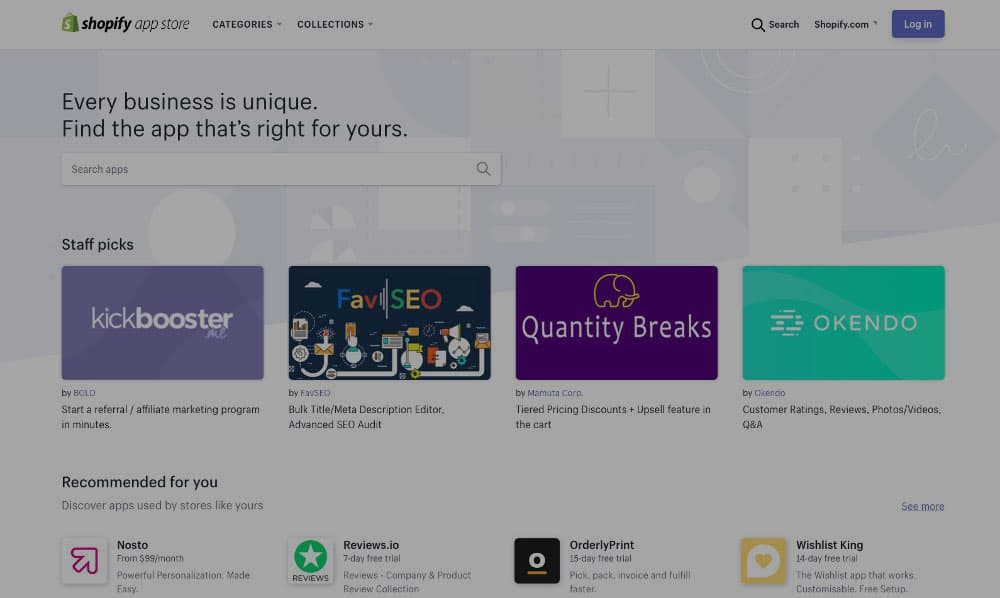
Thanks to the **Shopify App store,**merchants have access to an array of Shopify pluginsand Shopify appsfor every possibility. From marketing and customer support to inventory management and finding suppliers, you can fully customise the look and feel of your store and improve your marketing and conversion too!
So, how do you use it? This is the beginner’s guide to the Shopify App Store.
How the Shopify App Store Works
The Shopify App Store is a platform where merchants can purchase and install apps made by app developers who are part of the Shopify Partners Program. Apps have been downloaded over 12 million times since 2011. In September 2018, the app store was relaunched to help merchants find Shopify pluginsand Shopify Apps more easily.
What the New Shopify App Store Brings to the Table
The new changes to the Shopify App Store were done based on merchant feedback about what’s missing and what matters to them most. The new store features a superior structure, search options, categorisation, recommendations, and overview.
The most important updates to the store include:
- Improved categorisation option – A larger number of categories and 80 new subcategories give a better app and plugin overview, making it easier for merchants to find what they need.
- Redesign of app listing pages – Now, when you visit the Shopify apps pages, you will see the most important information first: what benefits it brings to your store, how much it costs, and what kind of support it includes.
- Improved search options – Search now includes additional filters that can really narrow down app selection based on specific needs.
- Improved Recommendations– Listed based on app functionality and usefulness to a specific merchant. Recommendations will also become more personalised based on what the merchant uses already.
Searching the New Shopify App Store
The main Shopify App Storelanding page is easy to use and will give you a fully personalised list of suggested apps based on your store. Plus, it will show you the apps you previously installed and searched for.
If you haven’t installed any Shopify pluginsor apps before, you will get a list of the most popular categories and overall highest rated.
There are three ways you can find what you need for your store:
1. Using the Search Bar
Simply start typing the query you are interested in. Shopify will also suggest additional terms to help you. Then, you can filter results by:
- Category
- Pricing options
- Results by their relevance to the search term
- The popularity of apps and plugins listed
- How old are they
2. Categories and Subcategories
You can browse a specific subcategory or all apps and plugins within the category.
3. You can browse ‘Collections’
These are predefined collections of Shopify appsand plugins that centre around a specific theme, like growing your business or apps that work with Shopify POS.
If you want to discover new Shopify pluginsand apps, you can also take a look at the latest Staff Picks, which highlight apps that Shopify staff feel provide great benefits to merchants. You can also take a look at Trending Apps or explore Shopify appsthat are quickly climbing the popularity ladder.
The new Shopify App Storehosts a bunch of improvements to make finding the right apps a breeze. Visit the store today and see how you can improve your business.
Related Posts
How to Successfully Migrate from Magento to Shopify or Shopify Plus without Losing SEO Positioning
At Techlyser, our Shopify Experts have been managing migrations from Magento to Shopify for the past 4 years and our typical client is a multimillion £/$ brand looking for more sta
What Are the Top 10 Features of Shopify Plus?
As the enterprise eCommerce platform, Shopify Plus is specifically targeted at large scale businesses with significant and growing profits. With a minimum monthly cost of $2,000, w
App Review: PreProduct
The PreProduct app enables Shopify store owners to collect orders for future and upcoming products. What does PreProduct do? This app allows you to pre sell your products before yo